
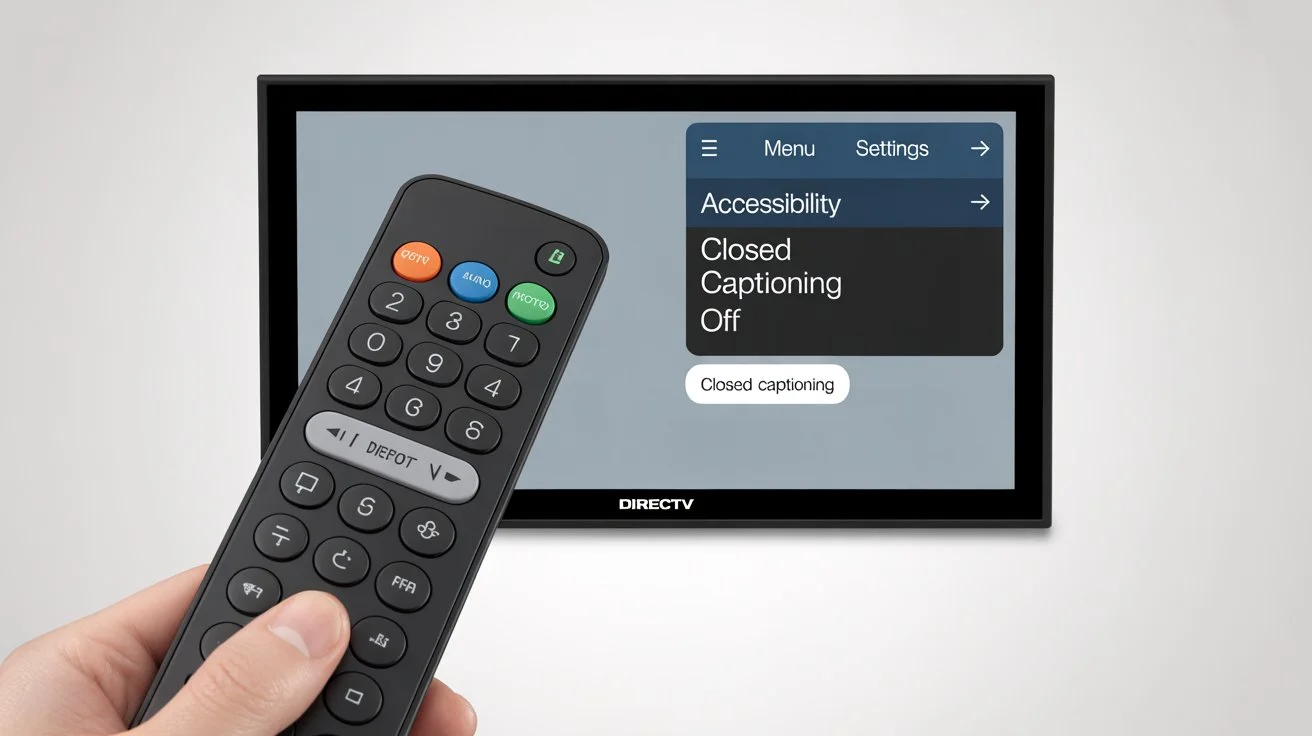
If you’re watching your favorite show or movie on DIRECTV and the captions keep popping up, you’re probably wondering, “How do I turn off closed caption on DIRECTV?” Closed captions are text overlays that display spoken dialogue and sounds, designed to help viewers who are deaf or hard-of-hearing. While they’re incredibly helpful for some, they can be distracting if you don’t need them. The good news? Turning them off is simple, and in this guide, we’ll walk you through every method—whether you’re using your remote, app, or smart TV. Let’s dive in!
What Are Closed Captions on DIRECTV?
Closed captions (CC) are text versions of spoken words, sound effects, and other audio cues in TV programs. They enhance accessibility and improve comprehension for people with hearing difficulties. On DIRECTV, closed captions can appear by default depending on your settings or the channel. Knowing how to turn off closed caption on DIRECTV ensures a cleaner, distraction-free viewing experience.
Why You Might Want to Turn Off Closed Captions
-
Distracting during movies or dramas 🎬
-
Covers important on-screen graphics or subtitles
-
Personal preference for a minimalist viewing experience
-
Avoids double subtitles when watching foreign content
-
Helps kids focus on visuals rather than text
How to Turn Off Closed Caption on DIRECTV Using Your Remote
The fastest way to disable closed captions is through your DIRECTV remote. Here’s how:
-
Press the MENU button on your DIRECTV remote.
-
Navigate to Settings > Accessibility.
-
Select Closed Captioning.
-
Choose Off.
Voilà! No more captions cluttering your screen.
Using the DIRECTV App to Turn Off Captions
If you’re streaming via the DIRECTV app on your phone or tablet:
-
Open the DIRECTV App.
-
Start playing your show.
-
Tap the CC icon on the player interface.
-
Select Off.
Your captions will disappear immediately.
Turning Off Captions on Smart TVs
Some smart TVs have their own caption settings that override DIRECTV:
-
Press the Home/Menu button on your TV remote.
-
Navigate to Settings > Accessibility.
-
Look for Closed Captions or Subtitle Settings.
-
Toggle Off.
Shortcut Methods for DIRECTV Remote Models
DIRECTV remotes vary, and some offer shortcuts:
-
RC65/RC66 Models: Press CC button directly to toggle captions on/off.
-
RC71/RC73 Models: Press Menu > Settings > Accessibility > CC Off.
-
Voice Remote: Say “Turn off captions” and the system will comply.
Checking Your Receiver Settings
Sometimes captions remain on due to receiver preferences:
-
Press Menu > Settings > Preferences.
-
Check Caption Default.
-
Ensure Off is selected.
Troubleshooting If Captions Won’t Turn Off
-
Restart your receiver 🔄
-
Update your DIRECTV app or receiver firmware
-
Double-check TV accessibility settings
-
Reset CC settings to default
Seasonal and Occasion-Based Captions
If you’re also a social media enthusiast and love using captions in posts, here’s some inspiration for when your content is playful or themed:
Winter Wonderland Captions ❄️
-
Snow much fun! ☃️
-
Cold hands, warm heart 💙
-
Let it snow, let it snow, let it snow ❄️
-
Cozy vibes only 🧣
-
Hot cocoa + Netflix = perfect combo ☕
Summer Fun Captions 🌞
-
Sun, sand, and smiles 🌊
-
Vitamin Sea, please 🌴
-
Summer state of mind ☀️
-
Tan lines & good times 🌺
-
Chasing sunsets 🌅
Cute Captions for Emotional Connection 💕
-
You + Me = ❤️
-
Forever starts with us
-
Love you to the moon and back 🌙
-
My heart, my home 💖
-
Soulmate vibes ✨
-
Tag your partner ❤️
Funny Captions to Lighten the Mood 😂
-
Netflix stole my weekend 🛋️
-
I’m not lazy, I’m energy-efficient 😴
-
Fri-nally! 🍹
-
Adulting is hard, let’s nap 💤
-
Don’t follow me, I’m lost too 🗺️
Short One-Word Captions for Instagram ✨
-
Bliss 😍
-
Cozy ☕
-
Adventure 🌄
-
Wanderlust ✈️
-
Forever 💖
Niche Variations for Specific Audiences 🎯
-
Pet Lovers: Fur real, life’s better with paws 🐾
-
Foodies: Pizza is bae 🍕
-
Fitness Fans: Hustle for that muscle 💪
-
Travel Enthusiasts: Passport ready ✈️
-
Bookworms: Lost in pages 📚
Platform-Specific Caption Strategies
-
Keep captions short and engaging
-
Include a CTA like “Tag your partner ❤️”
-
Use 5–10 relevant hashtags
-
Longer captions are okay
-
Storytelling format works well
-
Encourage comments and shares
TikTok
-
Use trending phrases
-
Add emojis to emphasize emotion
-
Keep captions under 100 characters
Romantic & Emotional Psychology Behind Captions 💌
Captions do more than describe—they connect emotionally. Using words like forever, soulmate, or heart triggers attachment and intimacy responses in readers. People engage more when content evokes love, nostalgia, or humor. That’s why your captions can subtly enhance your personal brand and social media engagement.
Caption-Writing Framework
-
Hook – Start with attention-grabbing word or emoji
-
Emotion – Trigger an emotional response
-
CTA – Encourage interaction (comment, tag, share)
-
Hashtags – Use 5–15 contextually relevant hashtags
Example:
“Weekend vibes are here! 🌞 Who’s ready to chill? Tag your bestie! 💖 #WeekendMood #ChillTime #FriendshipGoals”
Common Mistakes to Avoid
-
Using too many hashtags (#hashtagoverload)
-
Ignoring grammar or spelling errors
-
Posting irrelevant captions
-
Overloading captions with emojis
-
Neglecting audience preferences
Suggested Hashtags for Engagement 📈
-
#CaptionThis
-
#InstaMood
-
#LoveLife
-
#ForeverUs
-
#WeekendVibes
-
#SoulmateGoals
-
#HappyHeart
-
#NetflixAndChill
-
#EmojiLove
-
#ViralCaptions
FAQ: How to Turn Off Closed Caption on DIRECTV
Q1: How do I turn off captions on DIRECTV remote?
A: Press MENU > Settings > Accessibility > Closed Captioning > Off.
Q2: Can I turn off captions using the DIRECTV app?
A: Yes, tap the CC icon in the player interface and select Off.
Q3: Why do captions keep coming back?
A: Check your TV’s accessibility settings and receiver’s caption defaults.
Q4: Can I turn off captions for specific channels only?
A: Yes, some receivers allow channel-specific caption settings.
Q5: Are captions helpful for everyone?
A: They’re mainly for those who are deaf or hard-of-hearing but can also be used in noisy environments.
Q6: Can I use voice commands to turn off captions?
A: On voice-enabled remotes, say “Turn off captions”.
Q7: Do smart TVs override DIRECTV caption settings?
A: Sometimes, yes. Check your TV accessibility menu.
Q8: Can captions be customized?
A: Yes, you can change font size, color, and background through accessibility settings.
Q9: Will turning off captions affect recordings?
A: No, captions on recordings follow the settings when recorded.
Q10: Is there a universal shortcut for all DIRECTV remotes?
A: The CC button or Menu > Settings > Accessibility works for most models.
Emotional Conclusion
Closed captions are a wonderful accessibility feature, but they don’t have to cramp your style. Knowing how to turn off closed caption on DIRECTV gives you complete control over your viewing experience, whether you’re binge-watching dramas, enjoying family movie night, or streaming solo. And remember—just like crafting the perfect caption for your Instagram, adjusting your TV settings is all about creating your ideal, personalized experience. Now, your screen is clean, distraction-free, and ready for uninterrupted entertainment.
Take action today: Toggle off your captions, enjoy your shows, and maybe even save this guide for the next time you switch devices. Your viewing bliss awaits! 🌟

Grayson Hale is a passionate writer who transforms everyday thoughts into meaningful words. His work focuses on emotions, life experiences, and modern perspectives that connect deeply with readers.